Fotocast - Weather Forecast fo
- 3.9
- Rating
- 10.00K
- Installs
- Free
- Price
 Analysis by App-foxy
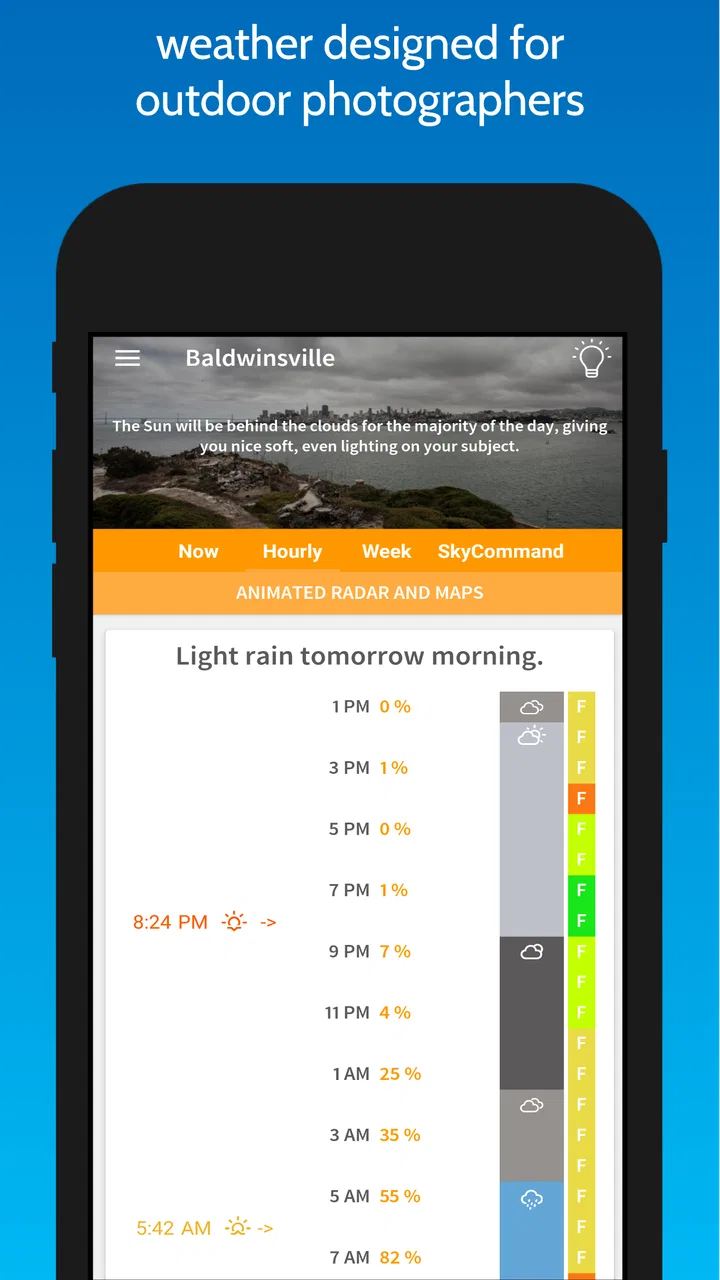
If you take photos outdoors, a normal weather app can feel a little too general. I often need a forecast that helps me decide whether a walk, landscape session, or sunrise attempt is worth the effort, not just whether I should carry an umbrella. Fotocast approaches weather from that creative angle. It is a free weather app from Dunbar Technology, LLC, designed with photographers in mind, and its most useful quality is the way it encourages you to think about conditions as part of a shooting plan.
That does not make it a replacement for every weather service. I would still want a more conventional source when I need severe-weather alerts, detailed radar work, or a broad everyday forecast at a glance. However, for someone who regularly asks, “Will the light and atmosphere be worth photographing?” this app has a more focused purpose. It is available for everyone, supports devices running Android 8.0 or later, and the current release is version 3.4.5.
What to expect before you plan a shoot
The first thing I would set correctly is my expectation. Fotocast is not simply a prettier version of a standard weather screen, and it is not a guarantee that a particular sky will produce a great image. Weather remains unpredictable, especially around sunrise, sunset, clouds, haze, and changing wind. What the app can do is give a photographer a more relevant starting point for deciding when to go out and what kind of scene may be worth pursuing.
You May Also Like

 Pandora - Music & Podcasts
Pandora’s Music Is Easy to Start, but Harder to Recover
Pandora’s strength is its low-effort path from a seed to a station. Its weak spot is how much confidence it asks you to place in connection, setup, and quiet recovery.

 8 Ball Pool
 Is Built on Rivalries, Rematches, and Routine
A close look at the rivalries, rematches, shared routines, and unanswered safety questions that turn a quick pool match into a persistent mobile community.

 Samsung Music
’s Quiet Strength Is Playing What You Already Own
Its reach comes less from spectacle than from dependable access to a personal library. That simplicity is both the app’s strongest retention engine and its ceiling.

 AccuWeather: Weather Radar
AccuWeather Review: A Quick, Clear Forecast for Everyday Decisions
For everyday plans, the best forecast is the one you can understand quickly. AccuWeather makes rain timing, radar, and local conditions easy to act on, with a few trade-offs.

 Hill Climb Racing
Why Hill Climb Racing Still Turns Crashes Into One More Run
A tiny car, a bumpy hill and one more upgrade: Hill Climb Racing keeps resurfacing because its simple chaos makes every near-miss feel personal.

 AliExpress - Shopping App
AliExpress Makes Global Shopping Feel Personal, but Shoppers Bear the Risk
AliExpress turns a global marketplace into a pocket-sized discovery engine. Its reach is useful, its shopping loop compelling, and its trade-offs easy to miss.
More From Our News Desk
View All News


That distinction matters because photographers often make decisions several hours before the important moment. A commuter may only need to know whether rain is likely during lunch. A photographer may need to decide whether to wake early, pack a tripod, drive to a viewpoint, and wait for a brief change in the sky. A weather tool aimed at that second situation feels more useful when it helps connect forecast information with the practical question of whether a session deserves the time.
In my experience, the best way to use this app is as a planning companion rather than an unquestionable authority. I would check it when choosing a day, revisit it before leaving, and then stay alert to what is actually happening outdoors. That habit prevents a common mistake: treating any forecast as a promise instead of one piece of evidence.
The app has a modest footprint in the store, with over ten thousand installs and an average rating of 3.9 from around 349 ratings. That suggests a specialized tool with a real audience, but not one that has become a universal weather replacement. I see that as useful context for a first-time user. It is worth trying if the photographer-focused approach matches your needs, while people looking for the most comprehensive general forecast may prefer to keep another weather app available.
Who will get the most from it
I would recommend Fotocast first to landscape photographers, travel photographers, hikers who carry a camera, and anyone who plans outdoor portraits around natural light. It can also suit beginners who do not yet know which weather details matter for photography. Instead of opening a general forecast and trying to translate every number into a creative decision, they can begin with a tool built around the idea that weather affects the image itself.
It is less convincing for someone who mainly wants hourly rain timing, storm tracking, pollen information, or a fast commute forecast. Those needs belong to the broader weather-app category, where established alternatives often offer more layers and more familiar emergency-focused tools. I also would not choose this as my only source before a long trip into a remote area. A photography-oriented forecast is helpful, but it should not replace sensible preparation or a second look at local conditions.
The trade-off is clear: a narrower purpose can make an app easier to approach, but it may also mean that users who want every possible weather feature will feel restricted. Before installing, ask yourself whether your main question is “What will the weather do?” or “How might the weather affect my photographs?” Fotocast makes more sense for the second question.
Starting without overthinking the setup
After installing the app, I would begin with one familiar place rather than immediately trying to plan an ambitious trip. Choose the location where you usually take photographs, then spend a few minutes learning how the forecast is presented. The goal is not to memorize every detail. It is to understand which parts of the screen help you decide whether to shoot, what to bring, and when to arrive.
A first-time user may be tempted to judge the app after one glance. I think that is too quick. Weather information becomes more useful when you compare it with the conditions you can actually see. On a clear morning, notice how the forecast relates to the appearance of the sky. On a cloudy day, consider whether the information helps you distinguish between a flat, dull session and a day with the possibility of more interesting atmosphere. This small habit turns the app from a passive display into a planning tool.
I would also avoid changing too many decisions at once. Start by using the app for a short local outing. Decide on a simple subject, such as a park, waterfront, or familiar street, and use the forecast to choose your departure time. This gives you a low-risk way to learn how much confidence you should place in the information without wasting a full day or an expensive journey.
The age rating is Everyone, which fits the straightforward nature of a weather-planning application. The app is free to install, although in-app purchases range from $1.99 to $59.99 per item. I would pay attention to the purchase screen during setup and make sure I understand which optional elements are relevant to me before spending anything. A free starting point is valuable here because it lets a new user test the workflow first instead of committing immediately.
Turning a forecast into a real photography decision
My preferred first success with Fotocast would be a simple sunrise or sunset outing close to home. The process is more useful than merely opening the app and reading the forecast. First, I would choose a familiar viewpoint and look at the expected conditions. Then I would decide what kind of result I am hoping for: clean light, dramatic cloud texture, a soft overcast portrait, or a moody scene after unsettled weather.
Next, I would use the forecast to make one practical choice. That might mean bringing a wider lens for a large sky, packing protection for the camera, or choosing a location with shelter if the conditions look changeable. The important point is that the app should influence preparation, not dictate creativity. Even if the sky does not match expectations, the outing can still produce worthwhile images because the weather itself becomes part of the subject.
A realistic example is a weekend morning when I have only a short window before other plans. Rather than driving to a distant viewpoint based on optimism alone, I would check Fotocast for the chosen area, compare the expected conditions with the type of light I want, and select a nearby backup location. If the forecast looks promising, I go to the main viewpoint. If it looks uncertain, I choose the backup and keep the session flexible. This workflow reduces wasted travel while preserving the chance of finding an interesting scene.
That backup-location habit is one of the most useful ways to work with a photography weather app. Forecasts can be broadly right while still being locally disappointing. A distant hill may be hidden by cloud while a nearby lake has a clear opening in the sky. By preparing two or three locations with different views, you make uncertainty manageable instead of expecting perfect accuracy.
The app is most valuable when it changes a concrete decision about time, place, or equipment. If I open it only to admire a forecast and then ignore it, I am not getting much from the photography focus. If I use it to choose between a high viewpoint and a sheltered street, or between a sunrise attempt and an indoor editing morning, it earns its place on my phone.
Reading the information like a photographer
Photographers often need to interpret weather differently from ordinary users. A completely clear forecast may be excellent for crisp architectural images but disappointing for a dramatic landscape. Thick cloud may be frustrating for a sunrise enthusiast yet ideal for portraits with soft, even light. Wind can add movement to trees and water, but it can also make a long exposure or tripod setup harder. The app cannot make those creative choices for me, but its photography-centered purpose encourages me to ask them.
I find it useful to separate “good weather” from “good photographic weather.” Those are not the same thing. A bright, comfortable day may produce ordinary light, while a day with changing conditions can create more character. When I use Fotocast, I would look for opportunities rather than simply searching for the most pleasant forecast.
Another practical insight is to match the forecast horizon to the commitment involved. For a quick local walk, I can tolerate more uncertainty. For a long drive, I want to check repeatedly and keep a fallback plan. The app is easier to trust when I use it proportionally: a rough guide for early inspiration, a closer reference before departure, and never the only reason to take safety risks.
There is also a difference between planning a subject and planning a mood. If I want a specific bridge or building, the location may matter more than the exact sky. If I want a particular atmosphere, I should be ready to change the subject when conditions shift. Fotocast fits the second approach especially well because it keeps weather at the center of the creative decision.
Common points of confusion and everyday friction
A likely source of confusion for new users is expecting a photography-focused forecast to behave exactly like a full general-purpose weather service. The app’s identity is its strength, but it also sets a boundary. If I need a complete emergency-preparedness picture, I would cross-check with a service built around alerts and detailed local monitoring. That is not a criticism of Fotocast so much as a reminder to use the right tool for the right question.
Another possible frustration is forecast uncertainty itself. A photographer may interpret a promising outlook as a promise of spectacular light, then arrive to find the sky has changed. That disappointment is easy to blame on the app, but it is better handled by treating the forecast as a probability-based planning aid. I would bring a second composition in mind and accept that changing weather can produce a different, sometimes better, photograph.
The purchase structure may also make some users pause. Since the app is free but includes optional items priced from $1.99 to $59.99, I would not assume that every useful capability is included in the initial experience. Start with the free version, learn whether its presentation fits your routine, and only then consider whether an optional purchase solves a problem you actually have. Paying for features before understanding your own workflow is an easy way to turn a promising specialist app into an unnecessary expense.
Finally, the app may feel too specialized if your photography is mostly indoors or if you rarely plan around natural conditions. In that case, a normal weather app may already cover your needs with less adjustment. I would skip Fotocast if I wanted one application to handle every weather-related task, especially if detailed radar, alerts, or travel-oriented information are my priorities.
A workflow that makes the app worth keeping
Once I had used Fotocast for a few local sessions, I would build a repeatable routine. At the start of the week, I would look for days that appear suitable for the kind of images I want. The evening before a planned outing, I would check again and choose the main location plus a backup. On the morning itself, I would use the latest view to decide whether to leave early, adjust the route, or change the subject.
I would keep a small personal record of what actually happened, not as a formal scientific log but as a way to learn my local area. For example, I might notice that a certain viewpoint stays hazy even when the wider forecast looks clear, or that a nearby open field catches evening light longer than the town center. Over time, this local knowledge can improve my decisions more than constantly searching for a perfect forecast.
A second useful workflow is to use the app before packing. If the conditions suggest a short, flexible walk, I can travel light. If the outlook looks unsettled, I can add weather protection and choose a location with easy access to shelter. If I expect soft, flat light, I may bring subjects that work well without strong shadows instead of forcing a dramatic landscape composition.
This is also where the app can help beginners learn. Rather than trying to understand every technical aspect of weather at once, they can connect one forecast pattern with one photographic result. Over several outings, that builds practical judgement: which conditions suit portraits, which suit reflections, and which are better for abstract details or black-and-white work.
How it compares with ordinary weather alternatives
Compared with a typical weather app, Fotocast has a more deliberate creative angle. A general service is usually better when I want a broad overview of temperature, rain, alerts, and daily planning. It may also be faster for someone who checks the weather many times a day for commuting or errands. Fotocast becomes more attractive when the forecast is part of a photography decision rather than a household routine.
Compared with checking several unrelated sources, a specialist app can reduce the mental work of translating weather into a shooting plan. Instead of asking what a general forecast means for a landscape session, I can begin from a photography-first perspective. The cost of that focus is that I should not expect it to cover every possible weather task with the depth of a dedicated meteorological service.
I would therefore use Fotocast alongside, not necessarily instead of, my usual weather source when the outing matters. For a nearby walk, it may be enough on its own. For a remote landscape trip, a paid assignment, or a situation where safety depends on changing conditions, I would verify the plan elsewhere and prepare conservatively. That combination gives the specialist app a clear role without asking it to do everything.
My recommendation after using the full workflow
Fotocast is a focused weather app that makes the most sense when photography is the reason I care about the forecast. Its free entry point makes it easy to test, and Dunbar Technology, LLC has kept the concept clear enough that a first-time user can approach it without needing to be a weather expert. The current version, 3.4.5, supports Android 8.0 and later, so compatibility is straightforward for many older devices as well as newer ones.
I like it most as a decision-making aid: choose a promising time, prepare for the conditions, keep a backup location, and remain open to photographing what actually appears. That is more realistic than expecting an app to guarantee perfect light. The focused design may not satisfy users who want a complete weather toolbox, and the optional purchases mean I would explore the free experience carefully before paying.
For a beginner, my advice is simple. Install it, start with a familiar nearby location, and plan one short outing rather than a major trip. Use the forecast to make one practical choice, then compare the prediction with the real sky. If that process helps you spend less time guessing and more time making photographs, the app is doing its job.
My final view is positive but specific: Fotocast is worth trying for outdoor photographers who want weather information to support creative planning. I would not make it my only source for serious travel or safety decisions, and I would skip it if I only need a basic daily forecast. For the right user, though, it offers a useful change in perspective: weather is not merely an inconvenience to work around, but one of the materials from which a photograph is made.
FAQs for Fotocast - Weather Forecast fo
01What is Fotocast - Weather Forecast, and what does it offer?
Fotocast - Weather Forecast is a weather application designed to provide current conditions, forecasts, and weather-related information in a visually accessible format. After exploring the app, its main appeal is the combination of forecast details and location-based updates, helping users check temperature, precipitation, wind, and other conditions before traveling, commuting, or planning outdoor activities.
02How accurate are the forecasts in Fotocast - Weather Forecast?
Forecast accuracy depends on the weather data providers, your selected location, and how far ahead you are checking. In general, short-term forecasts are more dependable than long-range predictions, while rapidly changing conditions can still produce differences. Fotocast is useful for everyday planning, but users should treat severe-weather information and official local alerts as the most authoritative sources.
03Does Fotocast require my location, and can I add multiple cities?
The app may request location access so it can automatically display weather for your current area. You can usually choose whether to grant precise or approximate access, depending on your device settings. If you prefer not to share location data, you can manually search for a city. Multiple saved locations are useful for checking home, work, travel destinations, or family members’ areas.
04Is Fotocast - Weather Forecast free to download and use?
Fotocast can generally be downloaded without an upfront charge, although the available features may depend on the version installed and the platform you use. Some weather apps include advertising, optional subscriptions, or premium tools such as extended forecasts and enhanced visualizations. Before downloading, review the store listing for current pricing, in-app purchases, and any regional differences.
05Does Fotocast provide severe weather alerts and notifications?
Notification and alert features can vary according to your operating system, permissions, selected locations, and the weather data available in your region. If the app supports warnings, you may need to enable notifications and configure alert preferences manually. Fotocast should be considered a convenient forecasting tool rather than a replacement for official emergency alerts issued by local weather authorities.
Pros
- Clean interface makes forecasts easy to scan quickly.
- Provides useful weather details beyond the current temperature.
- Helpful forecast views support planning for upcoming days.
- Location-based updates make local conditions convenient to check.
- Weather information is presented in a visually appealing format.
Cons
- Some advanced features may require a subscription or in-app purchase.
- Forecast accuracy can vary depending on location and data coverage.
- Frequent weather alerts may feel excessive for some users.
- The app may use noticeable battery for background location updates.
- Certain screens can feel crowded with information on smaller displays.

Fotocast - Weather Forecast fo
Gallery